# Use Cases and Receipts

In this chapter, we will explore the best practices for working with the Tydids framework. Through practical examples and real-life scenarios, you will learn how to effectively use the framework’s validation and cryptographic processes. This chapter aims to equip you with the knowledge to seamlessly integrate Tydids into your projects, ensuring robust security and reliable performance.

# Lending a drilling machine

![image.png](https://corrently.io/uploads/images/gallery/2024-07/scaled-1680-/0dGimage.png)[![image.png](https://corrently.io/uploads/images/gallery/2024-07/scaled-1680-/Qgsimage.png)](https://corrently.io/uploads/images/gallery/2024-07/Qgsimage.png)[![image.png](https://corrently.io/uploads/images/gallery/2024-07/scaled-1680-/4iuimage.png)](https://corrently.io/uploads/images/gallery/2024-07/4iuimage.png)

**In this scenario, Alice, a homeowner, wants to lend her drilling machine to Bob, a neighbor who needs to perform some home improvement tasks. To <span style="text-decoration: underline;">ensure transparency and trust</span>, Alice will receive a digital receipt confirming that she has lend the drilling machine from Alice.**

#### What should be achieved?

Transparency and trust between Alice and Bob about the lending of a drilling machine.

#### What should not happen?

- Alice and Bob do not want to make their real identities transparent to others.
- The fact that it is a lending process should not be exposed.
- The fact that a drilling machine should not be exposed.

#### How to do this?

For simplicity, both Alice and Bob know the ID of each other from the past. *(Hint: You get your ID by clicking on the upper right Icon. It will give your ID and allow you scanning the ID of someone else to see it).*

- Bob opens [https://tydids.com/](https://tydids.com/)
- Creates a new validation
- Using the "+" adds a field named "Fact" with the value "I borrow the drilling machine with serial number 1234"  
    [![image.png](https://corrently.io/uploads/images/gallery/2024-07/scaled-1680-/HvGimage.png)](https://corrently.io/uploads/images/gallery/2024-07/HvGimage.png)

- Bob signs the validation and gets a PDF document that he will give to Alice.
- Alice opens the Verifier of Tydids and validates the signatures and gives the drilling machine to Bob.

#### Important: Do only trust if you trust 

Basic rule: "Zero Trust"

The example has a single point where trust is needed: It relies on the past/history knowledge of the IDs (=*consensus*). But what if this does not exist? What if Bob just moved to the new house? A technical answer to this is "strong qualified signatures".

# Getting freelancer work signed off and paid

[![image.png](https://corrently.io/uploads/images/gallery/2024-07/scaled-1680-/4iuimage.png)](https://corrently.io/uploads/images/gallery/2024-07/4iuimage.png)[![image.png](https://corrently.io/uploads/images/gallery/2024-07/scaled-1680-/HYmimage.png)](https://corrently.io/uploads/images/gallery/2024-07/HYmimage.png)[![0dGimage.png](https://corrently.io/uploads/images/gallery/2024-07/scaled-1680-/0dgimage.png)](https://corrently.io/uploads/images/gallery/2024-07/0dgimage.png)



**Alice works for a multinational corporation and needs to sign a new consulting agreement with Bob, a contractor providing services to her company. The agreement outlines the terms of Bob's freelance work, and payment should be made directly to his designated wallet.**

#### eIDAS in a Nutshell

The eIDAS (electronic IDentification, Authentication and trust Services) regulation simplifies secure electronic interactions within the European Union. It ensures businesses, citizens, and governments can interact digitally with standardized identification methods and trust services – all seamlessly working across EU member states. This regulation promotes trust in electronic transactions, fostering a more integrated digital market within the EU.

#### Goal

To securely sign the consulting agreement in a way that can be verified by a third party if necessary.

#### How to do this?

1. **Bob Prepares the Contract:** Bob creates and shares the contract electronically, attaching it to a validation request.
2. **Alice Signs the Contract:**
    - Alice visits [https://tydids.com/](https://tydids.com/).
    - She creates a new validation request.
    - Uploads the contract as a PDF document (using the "Attach" button).
    - Signs the document electronically.
    - To ensure highest security, she then uses the "Request eID validation" button to finalize the signing with her electronic ID (eID).
3. **Verification and Payment:**
    - Once signed, Alice shares the eID-validated document with Bob, who can view it under "Verifications" in the online system.
    - Upon confirmation of the agreement and completion of Bob's services, Alice's company uses the verified eID information to transfer the payment directly to Bob's designated wallet.

# How ACME Corp  uses Self-Sovereign Identity (SSI) to give customers full control over their personal data

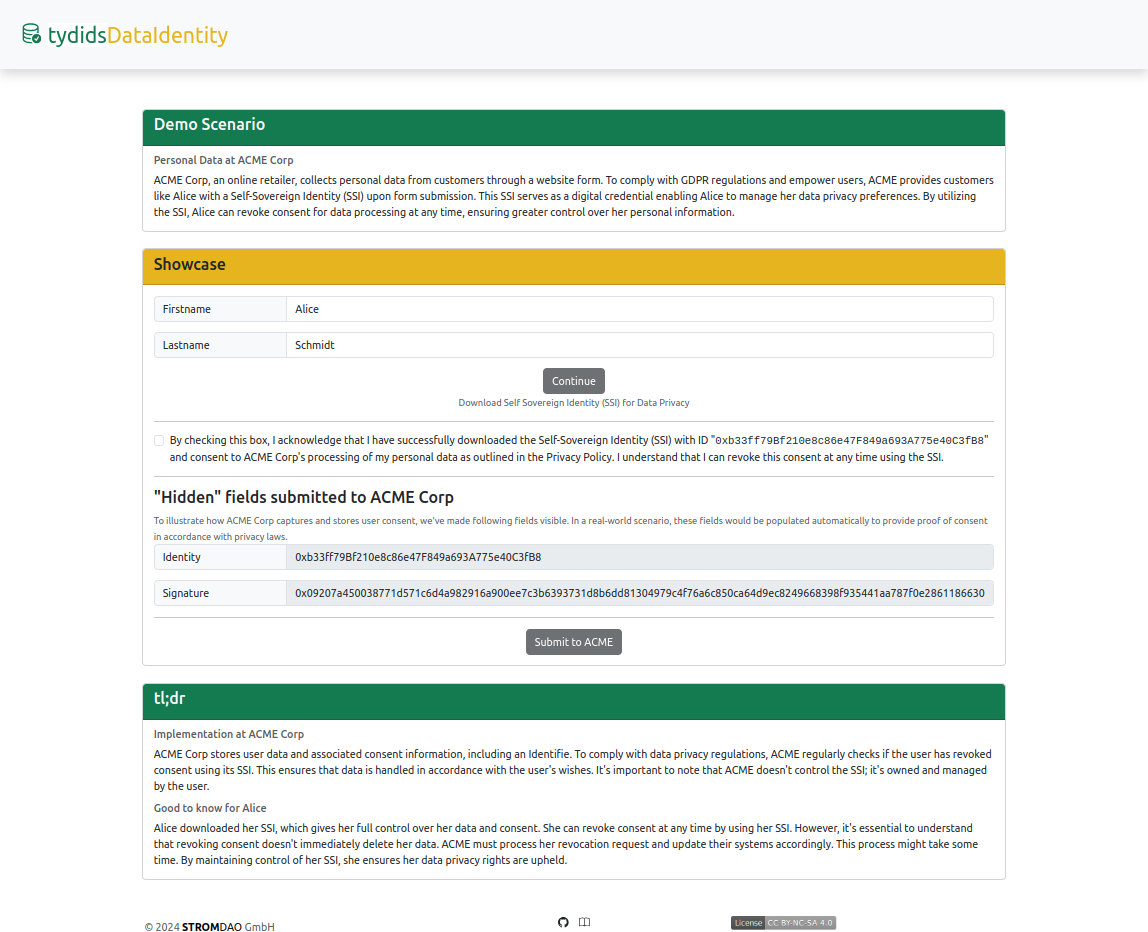
Showcase: [https://energychain.github.io/tydids-validation/public/DataIdentity/](https://energychain.github.io/tydids-validation/public/DataIdentity/)

### Scenario

Experience how ACME Corp. uses Self-Sovereign Identity (SSI) to give you full control over your personal data. With SSI, you can manage and revoke consent anytime, ensuring compliance with GDPR and other privacy regulations.

### Key Benefits

- **Full Data Control:** Download your SSI to manage consent preferences easily.
- **Privacy Compliance:** Ensure your data is handled according to GDPR and other privacy regulations.
- **User Empowerment:** Maintain ownership of your data and revoke consent at your discretion.
- **Seamless Integration:** ACME Corp. processes your revocation request efficiently, maintaining data privacy and security.

### Demo Instructions

1. **Download Your SSI:** Click "Download Self Sovereign Identity (SSI) for Data Privacy."
2. **Acknowledge and Consent:** Check the privacy checkbox to consent to ACME Corp.’s processing of your personal data.
3. **Submit Your Data:** Click "Submit to ACME" to see how your consent is securely handled.

### Why It Matters

By using SSI, you have unparalleled control over your personal information. Protect your privacy, ensure regulatory compliance, and experience the future of data consent management with TydidsDataIdentity.

[![image.png](https://corrently.io/uploads/images/gallery/2024-08/scaled-1680-/image.png)](https://energychain.github.io/tydids-validation/public/DataIdentity/ "Open Showcase")
# Check Grant Status via REST API

This document describes a simple REST API call to check the revocation status of a specific identity on Currently.io. This functionality is useful for organizations that implement the TyDIDS Trust Framework for GDPR compliance.

### API Endpoint

- **URL:** [https://api.corrently.io/v2.0/tydids/status?identity=](https://api.corrently.io/v2.0/tydids/status?identity=)&lt;identity&gt;
- **Method:** GET
- **Path Parameter:**
    
    
    - `<identity>`: Replace this with the identity you want to check the revocation status for. The identity is typically an SSI (Self-Sovereign Identity) identifier string.

### Response

The API responds with a JSON object containing information about the revocation status and consensus value. The HTTP status code of the response indicates the overall status of the request.

- **HTTP Status Code 200 (OK):**
    
    
    - **Body:**
        
        <div _ngcontent-ng-c347665101="" class="code-block ng-tns-c347665101-483 ng-trigger ng-trigger-codeBlockRevealAnimation" jslog="223238;track:impression;BardVeMetadataKey:[["r_1a2a4ab365d1ea79","c_873520ef584738e4",null,"rc_a503cb4a019b216b",null,null,"en",null,1,null,null,0,0]]"><div _ngcontent-ng-c347665101="" class="code-block ng-tns-c347665101-483 ng-trigger ng-trigger-codeBlockRevealAnimation" jslog="223238;track:impression;BardVeMetadataKey:[["r_1a2a4ab365d1ea79","c_873520ef584738e4",null,"rc_a503cb4a019b216b",null,null,"en",null,1,null,null,0,0]]"><div _ngcontent-ng-c347665101="" class="code-block-decoration header gmat-subtitle-1 ng-tns-c347665101-483 ng-star-inserted"><span class="ng-tns-c347665101-483">JSON</span></div><div _ngcontent-ng-c347665101="" class="code-block-internal-container ng-tns-c347665101-483"><div _ngcontent-ng-c347665101="" class="animated-opacity ng-tns-c347665101-483"></div></div></div></div>```
        {
          "status": "granted",
          "consensus": 40856
        }
        
        ```
        
        <div _ngcontent-ng-c347665101="" class="code-block ng-tns-c347665101-483 ng-trigger ng-trigger-codeBlockRevealAnimation" jslog="223238;track:impression;BardVeMetadataKey:[["r_1a2a4ab365d1ea79","c_873520ef584738e4",null,"rc_a503cb4a019b216b",null,null,"en",null,1,null,null,0,0]]"><div _ngcontent-ng-c347665101="" class="code-block-internal-container ng-tns-c347665101-483"><div _ngcontent-ng-c347665101="" class="animated-opacity ng-tns-c347665101-483"></div></div><div _ngcontent-ng-c347665101="" class="code-block-decoration footer gmat-overline ng-tns-c347665101-483 hide-from-message-actions ng-star-inserted" hide-from-message-actions=""><div _ngcontent-ng-c347665101="" class="ng-tns-c347665101-483"><span class="ng-tns-c347665101-483">Verwende den Code [mit Vorsicht](https://corrently.io/faq#coding).</span></div><div _ngcontent-ng-c347665101="" class="buttons ng-tns-c347665101-483"><button aria-label="Code kopieren" class="mat-mdc-tooltip-trigger copy-button ng-tns-c347665101-483 mdc-icon-button mat-mdc-icon-button gmat-mdc-button-with-prefix mat-unthemed mat-mdc-button-base gmat-mdc-button"></button></div></div></div>
    - **Description:** The identity has **not** revoked data approval.
        
        
        - `status`: String indicating the approval status. In this case, the value is `"granted"`.
        - `consensus`: Integer representing the number of the latest consensus reached at the time of the request.
- **HTTP Status Code 403 (Forbidden):**
    
    
    - **Body:**
        
        <div _ngcontent-ng-c347665101="" class="code-block ng-tns-c347665101-484 ng-trigger ng-trigger-codeBlockRevealAnimation" jslog="223238;track:impression;BardVeMetadataKey:[["r_1a2a4ab365d1ea79","c_873520ef584738e4",null,"rc_a503cb4a019b216b",null,null,"en",null,1,null,null,0,0]]"><div _ngcontent-ng-c347665101="" class="code-block ng-tns-c347665101-484 ng-trigger ng-trigger-codeBlockRevealAnimation" jslog="223238;track:impression;BardVeMetadataKey:[["r_1a2a4ab365d1ea79","c_873520ef584738e4",null,"rc_a503cb4a019b216b",null,null,"en",null,1,null,null,0,0]]"><div _ngcontent-ng-c347665101="" class="code-block-decoration header gmat-subtitle-1 ng-tns-c347665101-484 ng-star-inserted"><span class="ng-tns-c347665101-484">JSON</span></div><div _ngcontent-ng-c347665101="" class="code-block-internal-container ng-tns-c347665101-484"><div _ngcontent-ng-c347665101="" class="animated-opacity ng-tns-c347665101-484"></div></div></div></div>```
        {
          "status": "revoked",
          "consensus": 40850,
          "revoked": 1722722789
        }
        
        ```
        
        <div _ngcontent-ng-c347665101="" class="code-block ng-tns-c347665101-484 ng-trigger ng-trigger-codeBlockRevealAnimation" jslog="223238;track:impression;BardVeMetadataKey:[["r_1a2a4ab365d1ea79","c_873520ef584738e4",null,"rc_a503cb4a019b216b",null,null,"en",null,1,null,null,0,0]]"><div _ngcontent-ng-c347665101="" class="code-block-internal-container ng-tns-c347665101-484"><div _ngcontent-ng-c347665101="" class="animated-opacity ng-tns-c347665101-484"></div></div><div _ngcontent-ng-c347665101="" class="code-block-decoration footer gmat-overline ng-tns-c347665101-484 hide-from-message-actions ng-star-inserted" hide-from-message-actions=""><div _ngcontent-ng-c347665101="" class="ng-tns-c347665101-484"><span class="ng-tns-c347665101-484">Verwende den Code [mit Vorsicht](https://corrently.io/faq#coding).</span></div><div _ngcontent-ng-c347665101="" class="buttons ng-tns-c347665101-484"><button aria-label="Code kopieren" class="mat-mdc-tooltip-trigger copy-button ng-tns-c347665101-484 mdc-icon-button mat-mdc-icon-button gmat-mdc-button-with-prefix mat-unthemed mat-mdc-button-base gmat-mdc-button"></button></div></div></div>
    - **Description:** The identity has **revoked** data approval.
        
        
        - `status`: String indicating the approval status. In this case, the value is `"revoked"`.
        - `consensus`: Integer representing the number of the latest consensus reached at the time of the request.
        - `revoked`: Integer representing the timestamp (in Unix time) at which the approval was revoked.

### Example Usage

- **Checking an identity that has not revoked data approval:**
    
    
    - API Call: [https://api.corrently.io/v2.0/tydids/status?identity=0x95Bee09c395c60883Fa8bb95F05404a71f7ee7F7](https://api.corrently.io/v2.0/tydids/status?identity=0x95Bee09c395c60883Fa8bb95F05404a71f7ee7F7)
    - Response Body:
        
        <div _ngcontent-ng-c347665101="" class="code-block ng-tns-c347665101-485 ng-trigger ng-trigger-codeBlockRevealAnimation" jslog="223238;track:impression;BardVeMetadataKey:[["r_1a2a4ab365d1ea79","c_873520ef584738e4",null,"rc_a503cb4a019b216b",null,null,"en",null,1,null,null,0,0]]"><div _ngcontent-ng-c347665101="" class="code-block ng-tns-c347665101-485 ng-trigger ng-trigger-codeBlockRevealAnimation" jslog="223238;track:impression;BardVeMetadataKey:[["r_1a2a4ab365d1ea79","c_873520ef584738e4",null,"rc_a503cb4a019b216b",null,null,"en",null,1,null,null,0,0]]"><div _ngcontent-ng-c347665101="" class="code-block-decoration header gmat-subtitle-1 ng-tns-c347665101-485 ng-star-inserted"><span class="ng-tns-c347665101-485">JSON</span></div><div _ngcontent-ng-c347665101="" class="code-block-internal-container ng-tns-c347665101-485"><div _ngcontent-ng-c347665101="" class="animated-opacity ng-tns-c347665101-485"></div></div></div></div>```
        {
          "status": "granted",
          "consensus": 40856
        }
        
        ```
        
        <div _ngcontent-ng-c347665101="" class="code-block ng-tns-c347665101-485 ng-trigger ng-trigger-codeBlockRevealAnimation" jslog="223238;track:impression;BardVeMetadataKey:[["r_1a2a4ab365d1ea79","c_873520ef584738e4",null,"rc_a503cb4a019b216b",null,null,"en",null,1,null,null,0,0]]"><div _ngcontent-ng-c347665101="" class="code-block-internal-container ng-tns-c347665101-485"><div _ngcontent-ng-c347665101="" class="animated-opacity ng-tns-c347665101-485"></div></div><div _ngcontent-ng-c347665101="" class="code-block-decoration footer gmat-overline ng-tns-c347665101-485 hide-from-message-actions ng-star-inserted" hide-from-message-actions=""><div _ngcontent-ng-c347665101="" class="ng-tns-c347665101-485"><span class="ng-tns-c347665101-485">Verwende den Code [mit Vorsicht](https://corrently.io/faq#coding).</span></div><div _ngcontent-ng-c347665101="" class="buttons ng-tns-c347665101-485"><button aria-label="Code kopieren" class="mat-mdc-tooltip-trigger copy-button ng-tns-c347665101-485 mdc-icon-button mat-mdc-icon-button gmat-mdc-button-with-prefix mat-unthemed mat-mdc-button-base gmat-mdc-button"></button></div></div></div>
- **Checking an identity that has revoked data approval:**
    
    
    - API Call: [https://api.corrently.io/v2.0/tydids/status?identity=0xa8CD7c57c144be63852Da3C44D97088A740D43Cd](https://api.corrently.io/v2.0/tydids/status?identity=0xa8CD7c57c144be63852Da3C44D97088A740D43Cd)
    - Response Body:
        
        <div _ngcontent-ng-c347665101="" class="code-block ng-tns-c347665101-486 ng-trigger ng-trigger-codeBlockRevealAnimation" jslog="223238;track:impression;BardVeMetadataKey:[["r_1a2a4ab365d1ea79","c_873520ef584738e4",null,"rc_a503cb4a019b216b",null,null,"en",null,1,null,null,0,0]]"><div _ngcontent-ng-c347665101="" class="code-block ng-tns-c347665101-486 ng-trigger ng-trigger-codeBlockRevealAnimation" jslog="223238;track:impression;BardVeMetadataKey:[["r_1a2a4ab365d1ea79","c_873520ef584738e4",null,"rc_a503cb4a019b216b",null,null,"en",null,1,null,null,0,0]]"><div _ngcontent-ng-c347665101="" class="code-block-decoration header gmat-subtitle-1 ng-tns-c347665101-486 ng-star-inserted"><span class="ng-tns-c347665101-486">JSON</span></div><div _ngcontent-ng-c347665101="" class="code-block-internal-container ng-tns-c347665101-486"><div _ngcontent-ng-c347665101="" class="animated-opacity ng-tns-c347665101-486"></div></div></div></div>```
        {
          "status": "revoked",
          "consensus": 40850,
          "revoked": 1722722789
        }
        
        ```
        
        <div _ngcontent-ng-c347665101="" class="code-block ng-tns-c347665101-486 ng-trigger ng-trigger-codeBlockRevealAnimation" jslog="223238;track:impression;BardVeMetadataKey:[["r_1a2a4ab365d1ea79","c_873520ef584738e4",null,"rc_a503cb4a019b216b",null,null,"en",null,1,null,null,0,0]]"><div _ngcontent-ng-c347665101="" class="code-block-internal-container ng-tns-c347665101-486"><div _ngcontent-ng-c347665101="" class="animated-opacity ng-tns-c347665101-486"></div></div><div _ngcontent-ng-c347665101="" class="code-block-decoration footer gmat-overline ng-tns-c347665101-486 hide-from-message-actions ng-star-inserted" hide-from-message-actions=""><div _ngcontent-ng-c347665101="" class="ng-tns-c347665101-486"><span class="ng-tns-c347665101-486">Verwende den Code [mit Vorsicht](https://corrently.io/faq#coding).</span></div><div _ngcontent-ng-c347665101="" class="buttons ng-tns-c347665101-486"><button aria-label="Code kopieren" class="mat-mdc-tooltip-trigger copy-button ng-tns-c347665101-486 mdc-icon-button mat-mdc-icon-button gmat-mdc-button-with-prefix mat-unthemed mat-mdc-button-base gmat-mdc-button"></button></div></div></div>

### GDPR Compliance

Organizations implementing the TyDIDS Trust Framework for GDPR can use this API to regularly check the revocation status of identities. If an identity revokes data approval, the organization can take appropriate actions, such as stopping data processing or informing the user.